





The promise of low-code transformation has captivated enterprise leaders worldwide. According to Gartner, 70% of new applications will use low-code or no-code technologies by 2026, up from less than 25% in 2023. Microsoft Power Platform powers this change, enabling companies to build business software incredibly fast. But the velocity that makes low-code attractive also creates substantial governance challenges that can turn innovation into liability.
Recent security incidents underscore these risks. In 2021, UpGuard discovered that misconfigured Power Apps portals exposed 38 million records across 47 companies, including American Airlines, Ford, Microsoft itself, and government agencies in Indiana, Maryland, and New York City. More recently, in November 2024, AppOmni researchers identified that misconfigured Power Pages sites leaked 1.1 million NHS employee records, including email addresses, phone numbers, and home addresses. These incidents are a kind of reality check: platforms used by over 250 million people monthly require enterprise-grade governance frameworks.
Shadow IT now accounts for 30-40% of IT spending in large enterprises according to Gartner, with some estimates reaching 50%. The average business spends $135,000 annually on unnecessary software licenses, while data leaks cost an average of $4.35 million per incident. When in-house dev teams create software without deep knowledge and hands-on expertise, organizations risk facing compliance violations, audit findings, and operational chaos.
In this article we offer a practical governance framework for scaling Power Platform while maintaining enterprise security and compliance.

Environment strategy
A disciplined environment strategy forms the foundation of Power Platform governance. Companies must move beyond the default environments and implement structured separation between development, testing, and production workflows.
The traditional Dev/Test/Prod model remains essential for low-code platforms. Development environments should provide makers with ability to experiment and iterate rapidly, utilizing test data and loose security constraints.
Testing environments must mirror production configurations while enabling thorough validation of functionality, integrations, and security controls before deployment.
Production environments require the strictest controls, with formal change management, comprehensive logging, and restricted access to authorized personnel only.
Businesses should implement managed environments, a Power Platform feature that enables administrators to set custom usage insights, limits, and governance policies at the environment level. For example, managed environments allow teams to enforce weekly active user limits, set usage insights dashboards, and require maker support for new apps and flows.
Data loss prevention
DLP policies are the primary mechanism for controlling data flow between connectors. Microsoft provides three connector groups:
- Business (trusted enterprise connectors like SharePoint and Dataverse),
- Non-Business (personal or untrusted services),
- Blocked (prohibited connectors).
Solutions can only use connectors from compatible groups, preventing scenarios where enterprise data flows to consumer services like Gmail or Dropbox.
The Power Pages and Power Apps data exposure incidents occurred precisely because companies failed to securely configure table permissions and anonymous access controls. In both 2021 and 2024 incidents, default settings allowed OData APIs and Web APIs to expose data to anonymous users when table permissions were not explicitly enabled.
Connector management and risk classification
Not all connectors pose equal risk. Premium connectors that access enterprise databases (SQL Server, Oracle) or document repositories (SharePoint, OneDrive for Business) require more stringent controls than standard connectors for internal collaboration tools. Custom connectors demand security review before approval, as they can bypass built-in DLP controls if misconfigured.
It’s important to maintain a connector governance matrix that classifies connectors by data sensitivity, authentication requirements, and approval workflows. High-risk connectors accessing financial systems, healthcare records, or personally identifiable information should require security team approval and mandatory logging. Medium-risk connectors can use department-level approval, while low-risk internal collaboration connectors may operate with lighter oversight.
Development practices for low-code
The transition to enterprise-grade solutions demands formal ALM (Application Lifecycle Management) practices. While Power Platform’s low-code nature accelerates development, it does not eliminate the need for version control, testing, and structured deployments.
The basics of ALM
Power Platform solutions serve as the packaging mechanism for apps, flows, connectors, and data models. Managed solutions provide read-only packages for production environments, preventing unauthorized modifications and enabling clean uninstalls. Unmanaged solutions support active development with full editing capabilities. Organizations must enforce a strict rule: all production deployments use managed solutions exclusively.
A customer service solution, for instance, might include the customer portal app, automated case routing flows, email notification templates, and the underlying Dataverse tables. This cohesion enables teams to version, test, and deploy complete functionality as a unit.
Power Platform pipelines and Azure DevOps integration
Microsoft provides two primary approaches for automated deployments.
- Power Platform Pipelines offers a low-code approach to moving solutions between environments, with built-in approvals, deployment validation, and rollback capabilities. This approach proves ideal for organizations seeking to maintain governance while empowering citizen developers.
- Azure DevOps integration provides developers with familiar tools including Git source control, automated builds, comprehensive testing, and deployment pipelines. The ALM Accelerator, part of the CoE Starter Kit, bridges these worlds by providing a Canvas app interface for Azure DevOps operations, allowing makers to commit changes, create branches, and trigger deployments without deep DevOps expertise.
Quality controls
Production deployments must pass through defined quality gates. Automated testing verifies functionality, validates connector health, and checks for security vulnerabilities. Manual approval gates ensure that stakeholders review changes before they affect end users. Post-deployment validation confirms successful deployment and identifies any degradation in performance or functionality.
Simple environments may use a linear promotion model (Dev → Test → Prod). More complex scenarios benefit from Git-style branching with feature branches, pull requests, and merge controls. The key principle remains consistent: production changes must be traceable, reversible, and approved.

Ownership model
A Center of Excellence (CoE) provides the organizational structure, processes, and tooling needed to scale Power Platform while maintaining governance. A successful CoE balances enablement with control, supporting innovation while mitigating risk.
Application lifecycle
The CoE Starter Kit provides automated inventory capabilities that discover apps, flows, connectors, and environments across the tenant. This inventory becomes the foundation for lifecycle management, enabling teams to identify orphaned solutions, track usage patterns, and enforce retirement policies for unused assets.
Application cataloging should capture critical metadata including business owner, technical owner, data classification, dependencies, and support tier. This information is essential during security incidents, compliance audits, or business continuity planning. When the NHS data exposure occurred, companies with proper cataloging could quickly identify affected systems and stakeholders. Those without cataloging faced extended discovery phases that prolonged exposure risk.
Monitoring and telemetry
Effective governance demands continuous monitoring. The Power Platform Admin Center provides basic analytics on environment health, license consumption, and API usage. The CoE Starter Kit extends these capabilities with Power BI dashboards showing adoption trends, maker activity, connector usage, and potential compliance issues.
Automated alerts notify administrators of high-risk events: new premium connector usage, solutions shared with large groups, flows accessing sensitive data, or apps created in non-compliant environments. These notifications enable proactive intervention before minor configuration issues become major security incidents.

Security mapping
Dataverse security provides the enforcement layer for Power Platform governance. Unlike traditional databases with table-level permissions, Dataverse implements role-based security with granular control over create, read, update, delete, append, and share operations.
Security roles and least privilege
The principle of least privilege states that users receive only the minimum permissions needed for their responsibilities. Granting broad “System Administrator” or “System Customizer” roles to simplify development created the conditions for the 38 million record exposure, where applications inherited overly permissive access to OData endpoints.
Custom security roles should align with business functions. For example, a sales application might include roles for
- Sales Representatives (read/update access to opportunities),
- Sales Managers (full access plus reporting),
- Sales Operations (administrative functions).
Each role grants only the specific table and field permissions required, creating defense in depth that limits exposure from any single compromised account.
Business units and record-level security
Dataverse business units provide organizational hierarchy for security. A multinational corporation might structure business units by region (North America, EMEA, APAC) with subdivisions for countries or business lines. Record ownership automatically follows business unit boundaries, ensuring that European HR data remains inaccessible to North American users without explicit sharing.
Record-level security extends to hierarchical relationships. Team ownership enables multiple users to share access to records, while sharing rules grant access based on criteria like account territory or customer segment. These mechanisms provide flexibility while maintaining audit trails of who accessed what data when.
Audit logging and compliance
Dataverse audit logging captures create, update, and delete operations on tables where auditing is enabled. These logs are essential for compliance requirements like GDPR’s right to access, HIPAA’s audit controls, or SOX’s change tracking mandates. Companies should enable auditing on all tables containing sensitive data, with retention policies aligned to regulatory requirements.
Azure Monitor integration provides comprehensive logging of Power Platform operations including flow executions, connector usage, and authentication events. This telemetry enables security teams to detect anomalous patterns, investigate incidents, and demonstrate compliance during audits. When properly configured, organizations can trace every data access through the entire solution stack.
Warning signs of governance breakdown
Organizations should watch for these critical indicators that governance has failed or never existed. Any combination of these flags demands immediate remediation:
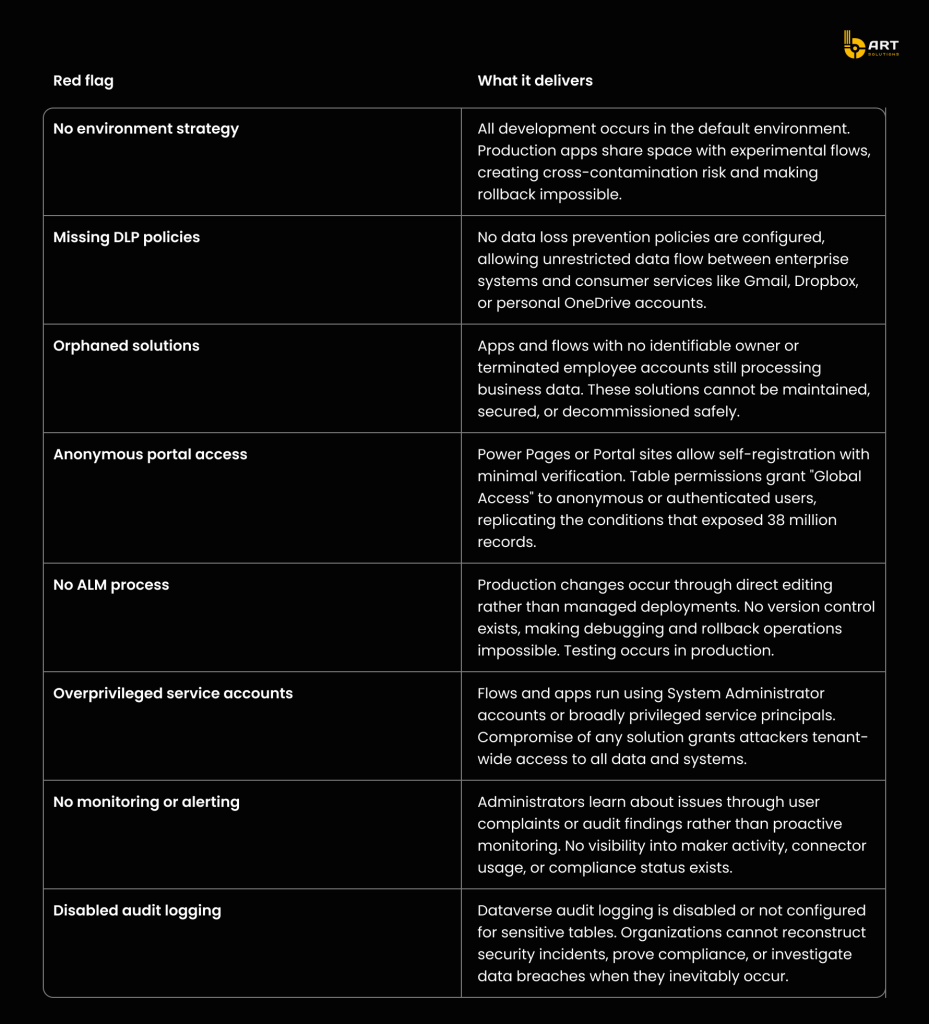
Keep in mind that three or more indicators mean an urgent need for governance intervention.
Emergency governance remediation
Businesses discovering governance gaps must take immediate actions while minimizing disruption to daily operations. This four-week plan prioritizes high-impact, low-risk interventions that establish baseline controls.
Week 1: Assessment and immediate risk mitigation
Begin by inventorying the Power Platform estate using PowerShell scripts or the CoE Starter Kit. Identify all environments, apps, flows, and custom connectors. Prioritize external-facing apps and flows handling sensitive data for immediate security review.
Implement emergency DLP policies blocking high-risk connectors to consumer services. Enable tenant isolation to prevent cross-tenant data sharing. Review all Power Pages and Portal sites for anonymous access permissions, disabling public access where not explicitly required. These actions provide immediate risk reduction while planning more comprehensive governance.
Week 2: Environment structure and access controls
Establish the foundational environment structure with separate Dev, Test, and Production environments. Migrate critical solutions from the default environment to dedicated production environments with proper security controls. Configure managed environments for production to enable usage insights and maker support.
Review and tighten environment maker permissions. Remove broad “Environment Maker” assignments from the default environment. Implement a request process for development environment access. This prevents casual experimentation in production spaces while maintaining agility in appropriate environments.
Week 3: DLP refinement and monitoring setup
Refine DLP policies based on business requirements and maker feedback from Week 2. Move approved connectors to the Business group while maintaining blocks on prohibited services. Implement connector-specific rules for scenarios requiring conditional access (geographic restrictions, authentication requirements).
Deploy the CoE Starter Kit Core components to begin automated inventory and monitoring. Configure Power BI dashboards for visibility into maker activity, solution distribution, and compliance status. These tools transform governance from reactive crisis management to proactive risk identification.
Week 4: Documentation and enablement
Document the governance framework including environment strategy, DLP policies, approval workflows, and support processes. Publish this documentation through internal knowledge bases and maker communities. Clear communication prevents frustration and non-compliance driven by confusion.
Launch maker enablement initiatives including office hours, training sessions, and template galleries. Position the CoE as a partner in innovation rather than an obstacle. Engage early adopters and solution champions to advocate for governance practices within their business units.
Schedule the 30-day governance review to assess progress, identify remaining gaps, and plan next-phase initiatives. This review should include quantitative metrics (number of DLP violations, solutions migrated, audit findings closed) and qualitative feedback from makers and business stakeholders.
Conclusion
Power Platform governance represents far more than risk mitigation or compliance checkbox exercises. Businesses that establish robust governance frameworks unlock sustainable competitive advantages through accelerated innovation, reduced security incidents, and improved operational efficiency.
As low-code platforms approach the 70% adoption threshold predicted by Gartner, governance transitions become mandatory. By combining automated monitoring, structured processes, and cultural transformation, CoE teams transform Power Platform from a source of governance anxiety into a strategic capability that accelerates digital transformation while protecting enterprise assets.
Why partner with Microsoft-certified experts
Implementing comprehensive Power Platform governance demands more than theoretical knowledge, it requires hands-on expertise with Microsoft’s ecosystem, proven experience in enterprise deployments, and deep understanding of security architecture.
Microsoft-certified developers bring critical advantages to governance implementations. Certified expertise ensures solutions align with Microsoft’s recommended practices and architectural patterns. Certification validates proficiency in Power Platform, Azure development, and Dynamics 365, assuring that governance frameworks follow proven methodologies rather than trial-and-error approaches.
The investment in Microsoft-certified expertise pays dividends through reduced risk, faster time-to-value, and governance frameworks that scale with organizational growth.
Ready to transform Power Platform from governance headache to competitive advantage? Talk to us, and let’s build technical excellence together.