





Ask any operations manager, sales coordinator, or HR business partner how they spend their afternoons, and you will hear a version of the same answer: reading emails, opening forms, typing the same fields into the same application. This is where an enormous amount of time disappears in many companies.
Those things are pretty hard to automate because traditional tools require structured, predictable input, and business reality is a lot messier: unstructured emails, PDFs from suppliers, scanned delivery notes, Word documents from partners. Getting that content reliably into a Dataverse record has always required a human in the middle, doing the translation.
Microsoft’s Power Apps MCP Server, released in public preview on 11 February 2026, is a direct answer to that problem.
What is MCP
Model Context Protocol (MCP) is an open standard that defines how AI agents communicate with external tools and data sources in a structured, predictable way. Think of it as a universal interface: instead of every AI integration being a custom build, MCP gives agents a standardised way to reach into any connected system and act on its data.
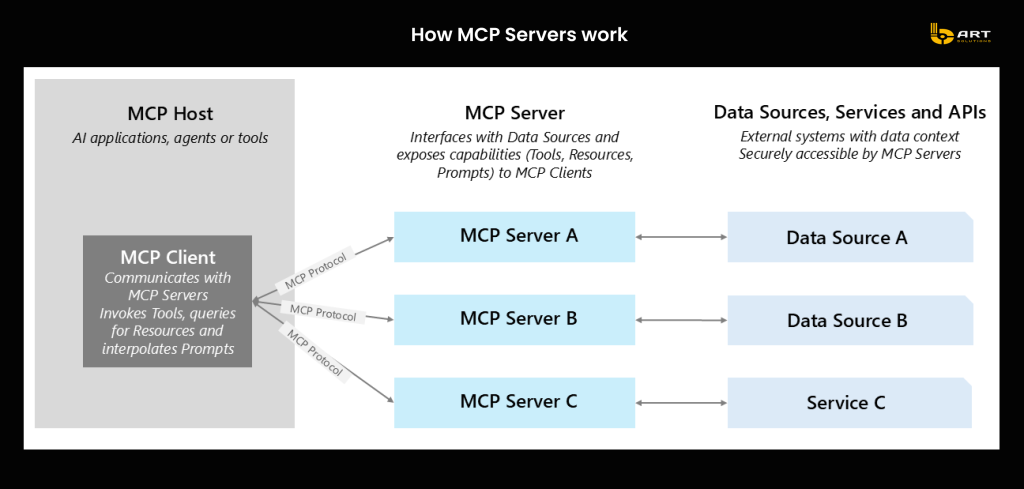
Microsoft is positioning MCP as the connective tissue between AI agents and enterprise business applications. Businesses that understand this architecture now will have a head start when these capabilities become standard expectations in enterprise software.
How the Power Apps MCP Server actually works
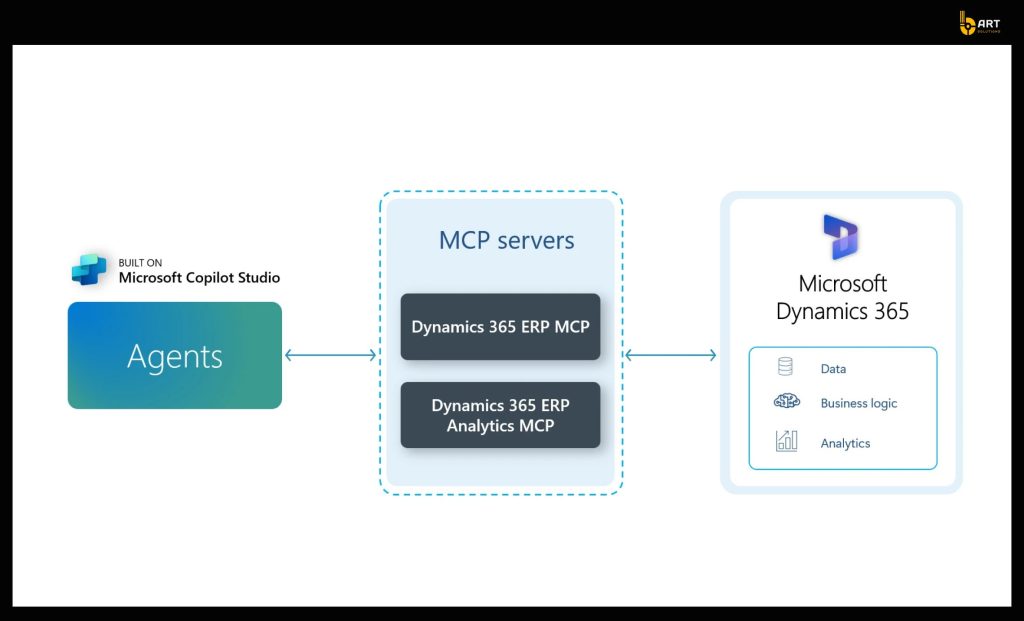
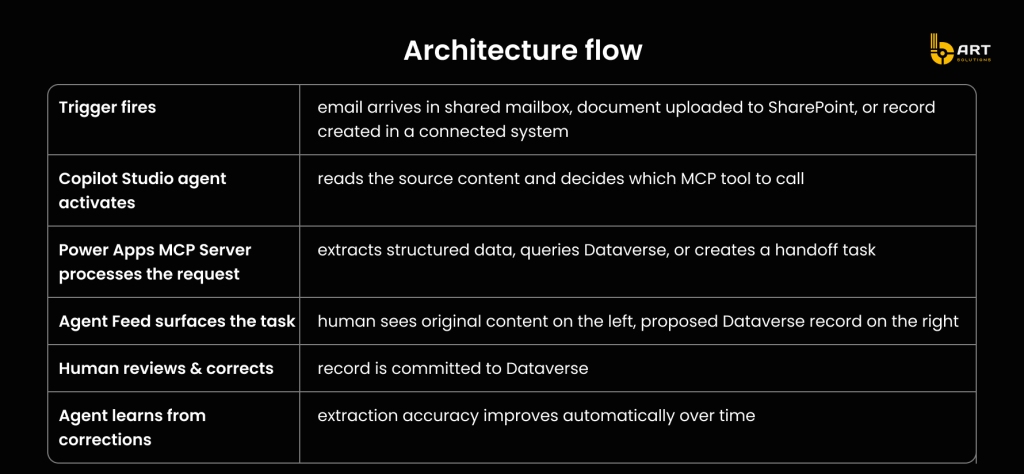
The Power Apps MCP Server connects Copilot Studio agents to the logic and data structures already defined in your model-driven Power Apps and Dynamics 365 environment. The agent receives a trigger such as an incoming email, a document uploaded to SharePoint, a new record in another system, processes the unstructured input, and then uses the MCP Server to interact with your Dataverse tables.
The human does not disappear from this process. Instead of doing the data entry themselves, they work in the Agent Feed, a dedicated task inbox built directly into the Power App, where they review, correct, and approve what the agent has prepared. This creates supervised automation within the CRM.
The three MCP tools
The Power Apps MCP Server exposes three tools to any Copilot Studio agent. Understanding what each one does, and when to reach for it, is the foundation of any implementation decision.
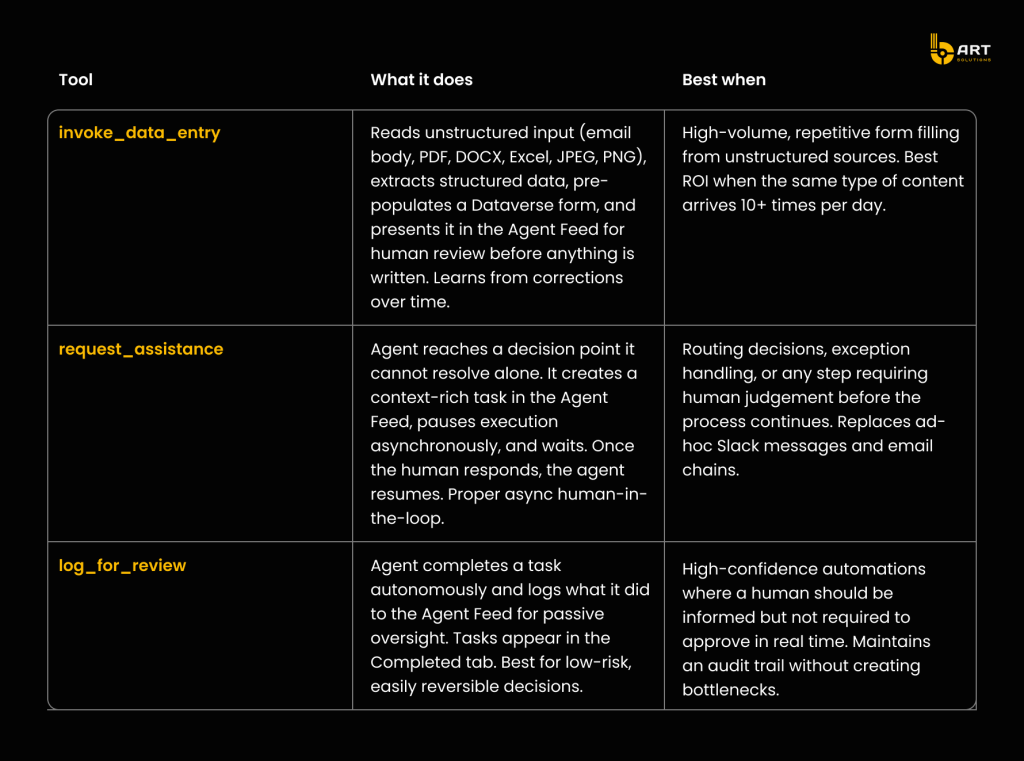
Where this value
The scenarios below reflect actual workflow patterns across industries running Dynamics 365. Each one represents a category of work where the combination of MCP tools and the Agent Feed changes the daily experience for the people doing the job, not by removing them from the process, but by removing the part they dislike most.
Field service job completion reports
A company running Dynamics 365 Field Service has 45 technicians in the field. At the end of each job, they email a completion summary: work performed, parts used, time on site, follow-up required, customer confirmation. A back-office coordinator reads each email and manually creates the service record in D365.
At 5 to 7 minutes per record and 40+ reports per day, that is over three hours of pure data entry daily. Across a year, it is hundreds of hours of a skilled coordinator’s time on work that produces no insight and no decision. And because different people enter data differently, field names are inconsistently populated, making downstream reporting unreliable.
With invoke_data_entry monitoring the shared mailbox, the agent reads each email on arrival, extracts every relevant field: technician ID, job reference, parts used, labour hours, follow-up flag; and pre-populates the D365 service record. The coordinator opens the Agent Feed, sees the original email alongside the proposed record, tweaks anything that needs correcting, and approves. Twenty seconds instead of six minutes. Consistent field population across every record.
Business value: Approximately 85% reduction in time-per-record for completion report processing. Immediate, compounding improvement in Dataverse data quality.
Supplier document processing
A mid-size manufacturer receives delivery confirmations, certificates of conformity, and quality test reports from suppliers as email attachments: PDFs, scanned documents, Excel files. Each one needs to be read and logged into a Dataverse-based supplier management application: supplier ID, batch number, delivery date, document type, compliance status, certification expiry date.
The procurement team handles this manually. It is slow and error-prone. A wrong batch number in a quality record creates compliance risk. A missed expiry date on a certification creates audit exposure. Manual entry means the team is always one tired Friday afternoon away from a data integrity problem.
With invoke_data_entry configured to process incoming attachments like PDF, DOCX, XLSX, and image formats are all supported. The agent extracts structured data from each document and queues a pre-filled Dataverse record for review. The procurement officer reviews and approves. Every record now has a clear chain: source document, agent extraction, human approval, timestamp. That is an audit trail that manual entry cannot produce.
Business value: Near-elimination of manual transcription errors. Audit-ready record chain for compliance purposes. Measurable reduction in compliance risk exposure.
Intelligent case routing for customer service
A B2B company using Dynamics 365 Customer Service receives 80 to 120 new support cases per day via email, web form, and partner portal submissions. Case routing involves a triage agent reading each case, checking the customer account in D365, assessing complexity and priority, and assigning it, often via a Slack message or email to the relevant team. High-priority cases from strategic accounts can sit for 30 to 40 minutes before the right person sees them.
With request_assistance, the agent reads each incoming case, queries the customer record and account tier in Dataverse, and routes a fully contextualised task card to the Agent Feed of the correct team. The card includes customer name and account tier, issue summary, case history excerpt, and a direct navigation link to the D365 record. The agent then pauses and waits. The team member opens the card, acts on it, assigns, escalates, or adds a note, and the agent resumes.
Business value: Significantly reduced time-to-first-response. Elimination of manual routing steps and the communication overhead that surrounds them. Consistent handling regardless of who is on triage that day.
Better hire and onboarding document processing
An HR team processing 15 to 20 new hires per month receives onboarding document packs by email: signed contracts, bank account forms, ID copies, address confirmations, tax declarations. Each pack needs to be read and used to populate employee records across multiple Dataverse tables with personal details, payroll information, emergency contacts, IT equipment requests.
Currently this is a two to three hour process per hire, spread across multiple systems with multiple copy-paste operations between documents and forms. Errors in payroll data in particular create downstream problems that take weeks to resolve and generate disproportionate internal friction.
With invoke_data_entry triggered by the document submission email, the agent processes the full pack, extracting data across all relevant Dataverse tables, and presents a complete set of pre-filled records in the Agent Feed. The HR coordinator reviews each record, corrects anything misread or missing, and approves. A two-hour multi-system process becomes a focused 15-minute review session. The agent improves with every correction, so accuracy increases with each hire processed.
Business value: Approximately 70% reduction in onboarding processing time per hire, meaningful reduction in payroll data errors.
What this means for your dynamics 365 setup
The most important thing to understand about the Power Apps MCP Server is what it is not. It is not a rearchitecture. It is not a migration project. It is not a reason to rebuild your existing model-driven apps or Dynamics 365 configuration.
It is an additive layer. If you already have Dynamics 365 and model-driven Power Apps running on Dataverse, the MCP Server connects to the tables, forms, and data structures you already have. Your existing Dataverse schema is the target for agent-prepared records. Your existing Power Apps interface is where the Agent Feed lives.
The main prerequisites to assess before starting:
Copilot Studio licensing this is the required agent orchestration layer. If your organisation does not have it in its Microsoft licensing agreement, that is the first conversation to have with your Microsoft account team.
Dataverse storage baseline Microsoft increased default capacity in December 2025 (Power Platform environments now include 10 GB by default; Dynamics 365 customers receive 20 GB). If you were approaching limits, your headroom is likely larger than you think.
A shared mailbox or SharePoint folder as trigger source is the most common and straightforward starting point for invoke_data_entry. If you have a shared inbox for any business process involving document intake, you already have a ready trigger.
For companies with custom .NET services
For organisations running hybrid architectures Power Platform for front-end and workflow orchestration, custom .NET services for complex business logic, Azure Functions for system integrations the MCP architecture fits naturally into existing patterns.
Copilot Studio agents can call custom APIs and Azure Functions alongside MCP tools within the same workflow. The recommended pattern for most enterprise scenarios is: MCP handles structured Dataverse operations while custom .NET code handles specialised business logic, complex calculations, or legacy system integrations. These two layers complement each other. They do not compete.
Where to start
If you want to move from reading to doing, here is a concrete starting point that does not require a project plan or a budget approval:
- Identify your highest-volume manual data entry process. Which team spends the most time reading external inputs like emails, documents, forms, and re-entering that information into Dynamics 365 or a Power App? That is your MCP pilot candidate. You are looking for volume (high daily frequency) and consistency (similar input types every time).
- Spin up a developer environment and run a real test. Connect a Copilot Studio agent to the Power Apps MCP Server using Microsoft’s Learn documentation. Use actual email samples or documents from your target process to test invoke_data_entry accuracy. Correct the agent’s extractions. Run it 20 times. Measure the baseline accuracy before and after corrections. The setup is faster than a typical integration project.
- Quantify the impact before you present it. Take your daily record volume, multiply by average manual entry time, and model what a 70% to 80% reduction looks like in hours per week and cost per month. That is the conversation that moves budgets and gets CTO attention.
If you would like a second perspective on which processes in your specific Dynamics 365 environment are the best candidates for MCP-assisted automation, or want to understand what a realistic implementation looks like for your architecture, talk to our Microsoft-certified developers.