

According to Forrester’s Total Economic Impact study of Microsoft 365 Copilot, companies investing in software development and implementing AI capabilities with professional oversight achieved a 116% ROI over three years, with benefits totaling $36.8 million against costs of $17.1 million. But these returns weren’t simply granted. They required skilled engineers who understand both the technical architecture and business context.
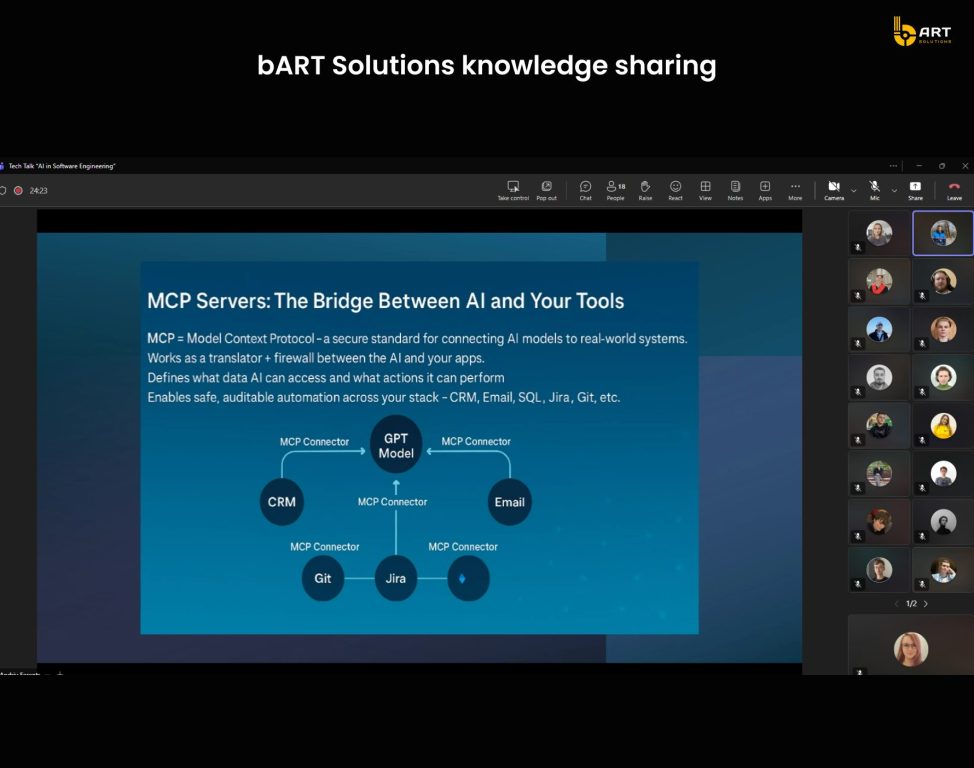
The Microsoft 2025 Release Wave 2 introduces autonomous agents, Model Context Protocol (MCP) integration, and agentic capabilities that represent the biggest leap in evolution of AI Copilot for Dynamics 365 to achieve customer engagement. These capabilities fundamentally change how Dynamics 365 Sales automation operates with AI.
The business value of AI Copilot in Dynamics 365
The description for AI in CRM sounds quite straightforward: automate data entry, gather insights, speed up decision-making. What’s rarely discussed is that these outcomes don’t come with licensing itself. They depend on developers who architect data flows, configure security policies, and handle Copilot integration with Dataverse in ways that match real business processes.
AI agents can work autonomously to research and engage leads, drive purchase intent, and show deal risks. The Sales qualification agent, for example, researches leads across multiple sources, judges readiness based on ideal customer fit and purchase intent, scores and automatically disqualifies low-intent prospects to maintain high pipeline quality.
But Microsoft doesn’t advertise that all agents need configuration. The qualification criteria, data sources, and scoring logic, all require D365 custom Copilot development. A sales team using default settings will get generic outputs. A team cooperating with Dynamics 365 developers who customize the agent for their ICP, integrate proprietary data sources, and tune the qualification thresholds will see a lot higher conversion rates.
The ROI difference is also measurable. According to Microsoft’s internal analysis, users of Microsoft 365 Copilot experienced a 9.4% increase in revenue per seller and a 20% increase in close rates. For SMEs, Forrester projects ROI ranging from 132% to 353% over three years. These returns correlate directly with implementation quality. Newman’s Own, with only 50 employees, tripled their monthly campaigns and saved 70 hours per month by using Copilot effectively. Outcomes that grow from understanding how to integrate the technology into existing workflows.

Why developer expertise defines Copilot’s true value
Microsoft Copilot Studio provides the platform, but as you’ve seen earlier, it’s Dynamics 365 implementation partner teams define whether outputs are useful or just noise.
Prompt engineering and data preparation
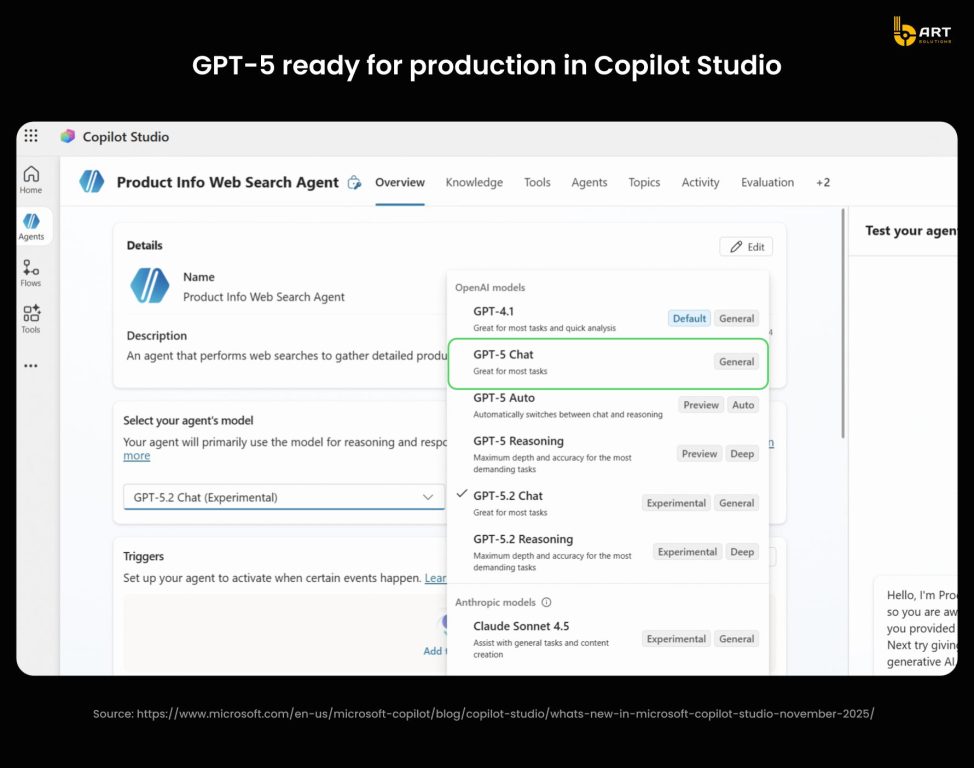
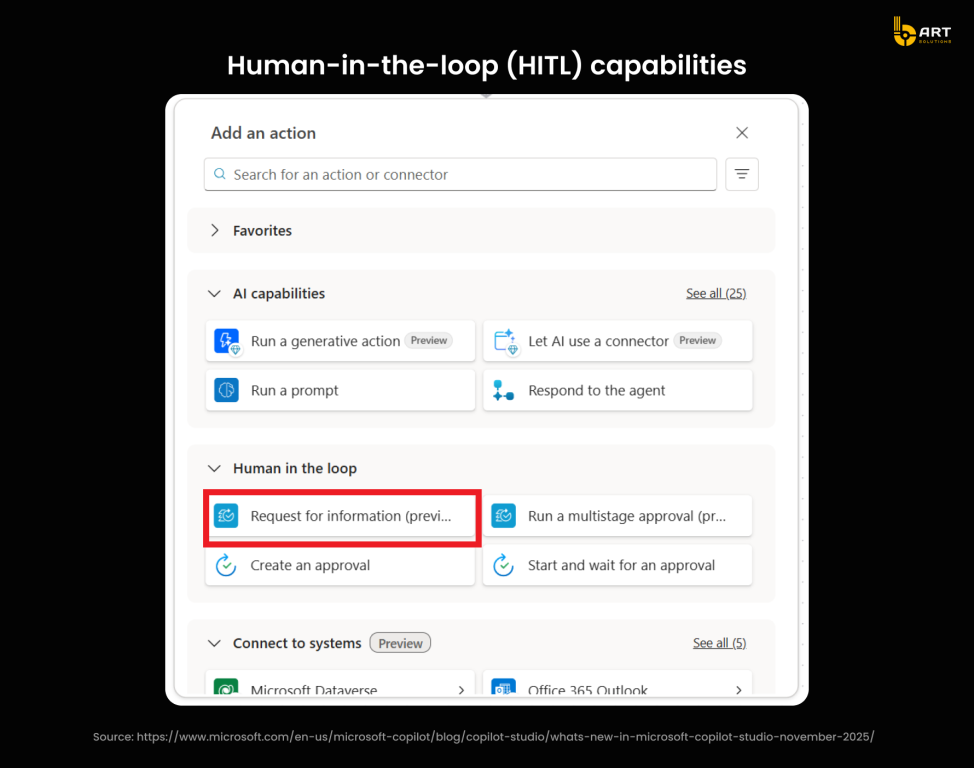
The November 2025 updates to Copilot Studio introduced GPT-5 Chat with improved responsiveness and accuracy. The model itself is more capable than previous ones, but the quality of outputs still completely depends on prompt design and data grounding. Agents built without proper data validation and prompt engineering produce hallucinations, irrelevant suggestions, or privacy violations.
For example, let’s take one more look at AI-driven lead qualification in Dynamics 365. The agent needs to access lead data, enrichment sources, and qualification criteria. So in this case it’s developers who configure the following: which Dataverse tables to query, which external APIs to call, how to handle missing data, what constitutes a qualified lead, and how to weight different signals. Each decision affects output quality. Poor configuration produces generic scores, advanced processes bring revenue.
Security and compliance requirements
Microsoft strengthened Copilot’s security architecture in 2025 with layered controls and enterprise-grade certifications. Each prompt and response is processed within the companies’ Microsoft 365 tenant boundary. Data encryption in transit and at rest is standard, but implementation still requires security expertise.
The Copilot Control System introduced in July 2025 consolidates enterprise-wide security, policy, and performance monitoring into a single dashboard. Administrators can track configuration changes, validate security posture, and meet regulatory requirements through unified audit logs.
The platform delivers oversight capabilities:
- Tenant-level visibility into active Copilot agents and usage trends.
- Reporting on prompt sources, data-sharing events, and restricted queries.
- Integrated insights into compliance drift and DLP violations.
- Recommendations for policy optimization based on observed user behaviors.
For security administrators, this dashboard provides real-time oversight of Copilot activity, streamlining risk management across large-scale deployments.
How it works
Two primary mechanisms control what information the AI can access and use.
Businesses apply sensitivity classifications to content, marking documents, emails, and conversations as confidential, internal-only, or public. When Copilot encounters classified content, it evaluates whether the requesting user has the necessary permissions. Content marked above the user’s clearance level becomes invisible to the AI, preventing exposure of restricted information regardless of how the prompt is structured.
Data Loss Prevention rules define what actions users can take with sensitive information, whether it can be copied, shared externally, or downloaded. These policies operate at the data layer, filtering content before it reaches the language model. When a user prompt would surface restricted information, the system removes that data from the context window, but doesn’t block the entire response.
The critical technical detail: interception happens at the token level during the grounding process. Copilot doesn’t process sensitive content and then redact outputs. It prevents restricted tokens from entering the inference pipeline. This architecture means the language model never sees data the user shouldn’t access, eliminating the risk of exposure through prompt manipulation or edge-case responses.
Implementing a robust Dynamics 365 Copilot governance and compliance framework requires configuring Purview sensitivity labels with inheritance rules, defining DLP policies that trigger at the correct data sensitivity thresholds, mapping Azure AD security groups to Copilot access permissions, and establishing exception workflows for legitimate business needs that conflict with default policies.
For regulated industries, such baseline configuration isn’t enough. AI CRM development service teams need to include field-level encryption for PHI or PII data, configure custom compliance boundaries that prevent cross-regional data access, establish audit retention periods that meet regulatory requirements, and build alerting workflows that notify compliance officers when threshold violations occur. Healthcare organizations need HIPAA-compliant data handling. Financial services require SOC 2 Type II controls. Government contractors must meet FedRAMP requirements.
Security configuration checklist:
- Configure minimum three sensitivity tiers (Public, Internal, Confidential) with automatic labeling based on content patterns. Credit card numbers trigger Confidential, customer names trigger Internal.
- Set label inheritance so Copilot-generated content adopts the sensitivity level of source data automatically.
- Block prompts containing SSNs, credit cards, and health data through DLP policies before they reach the language model.
- Configure policies preventing Copilot from processing files marked Highly Confidential, with notification workflows alerting compliance teams when users attempt restricted queries.
- Map Copilot permissions to existing security groups: sales accesses customer data, finance accesses financial data, with no cross-boundary access.
- Implement row-level security in Dataverse so agents only surface records users already have permission to see.
- Enable field-level encryption for regulated data types (diagnosis codes in healthcare, transaction details in finance).
- Configure geographic restrictions preventing sensitive data access from unauthorized regions.
- Establish audit retention periods matching regulatory requirements (7 years for HIPAA, SOC 2 Type II controls for financial services).
Connector governance:
- Block maker-provided credentials organization-wide and configure centralized Azure Key Vault for all third-party API connections.
- Establish approval workflows requiring IT review before custom connectors go live.
- Monitor connector activity for unexpected data volumes signaling potential exfiltration attempts.
Monitoring and validation:
- Deploy Copilot Dashboard to track user data access patterns, DLP violations, active agents, and frequently queried data sources. Review monthly and adjust policies based on actual usage patterns.
- Run quarterly audits to identify policy gaps based on violation patterns rather than assumptions.
Phased rollout
- Enable for IT team first (validate security controls work).
- Expand to pilot group of 50 users with high compliance awareness (30-day monitoring period).
- Address policy gaps before broader deployment.
Sales efficiency gains engineered by skilled D365 developers
Automated lead research and scoring
Microsoft’s own sales organization provides the clearest evidence of Dynamics 365 Sales AI automation impact. Over 10,000 sellers at Microsoft use Sales Copilot daily, with 85% reporting they complete tasks faster and 70% stating it improved their productivity.
Performance data from Sales Development Agent
Between January and November 2025, Microsoft’s Sales Development Agent reached 61,734 customers autonomously and achieved a 15.1% lead-to-opportunity conversion ratio. The agent operates independently researching leads, evaluating fit, and initiating qualified outreach without human intervention. This means that sales reps receive notifications only when leads meet qualification thresholds.
Cooperate with Dynamics 365 developers configure:
- Data source integration
LinkedIn profiles, company websites, news feeds, proprietary customer success databases, and competitive intelligence repositories all feed the research engine.
- Scoring logic customization
Microsoft’s agent weights budget signals (recent funding announcements, hiring patterns indicating growth) at 40%, technology stack alignment at 30%, urgency indicators at 20%, and decision-maker engagement at 10%. These percentages emerged from analyzing historical won/lost deals.
- Disqualification thresholds
Leads scoring below 60 get auto-disqualified with reasoning logged to the record. Leads scoring 80+ trigger immediate rep alerts. The 60-80 range enters nurture sequences.
- Natural language processing
Teaching the system to extract meaningful signals from unstructured text. “Secured $15M Series B” indicates budget availability. “Exploring strategic options” often signals distress rather than buying readiness.
- Cross-system intelligence
An AI agent doesn’t just score leads, it enriches them all the time. When a prospect’s company appears in news about regulatory changes, when decision-makers post on LinkedIn about technology challenges, or when service interactions indicate expansion opportunities, the agent updates lead records and adjusts prioritization.
Making this work requires Dynamics 365 implementation partner expertise for:
- MCP server connections enabling the agent to access ERP systems like Dynamics 365 Business Central for account history, customer service interactions for satisfaction indicators, and SharePoint for product documents relevant to prospect industries.
- Custom connector development for proprietary data sources. For example, a manufacturing company built connectors to their warranty claims database. High claim rates for competitors’ products indicate prospects experiencing pain points their solution addresses.
- Approval workflows for autonomous outreach. Healthcare organizations require compliance review before patient-facing communication. Financial services need disclosure validation. D365 custom Copilot development teams implement these guardrails.
Real world business impact
Lumen Technologies estimates $50 million in annual savings from Copilot-enhanced sales operations. Vodafone employees save 3 hours per week, reclaiming 10% of their workweek. But the deeper value is pipeline quality improvement.
Before agent-driven qualification, sales teams contacted everyone who submitted a form or downloaded content. Conversion rates averaged 3-5% because most leads weren’t ready. With intelligent qualification routing high-scoring leads to experienced reps and low-scoring leads to automated nurture, conversion rates improved to 12-15% for the qualified segment while reducing wasted rep time on prospects who won’t buy.

Marketing automation advantages when developers customize Copilot
Dynamic segmentation and persona modeling
The 2025 Release Wave 2 introduces Copilot-powered journey creator enabling marketers to design complete customer journeys through natural language descriptions. The feature targets audiences based on prior campaign signals, leveraging historical performance data for segmentation.
In practice, this requires configuration that generic setups miss. A German piano manufacturer using Dynamics 365 Customer Insights segmented customers based on purchasing behavior, website visit frequency, and marketing campaign interaction patterns. Each segment received specific incentives: new customer discounts versus exclusive offers for returning buyers. It resulted in increased repurchase rates, reduced churn, and higher loyalty program participation.
Making segmentation work requires AI CRM development services teams to configure:
- Unified customer profiles pulling data from CRM, website analytics, marketing platforms, and service interactions. Eagle Hills real estate consolidated these sources to enable personalized targeting that improved sales conversions.
- Behavioral scoring algorithms that weight different signals appropriately. A financial services provider analyzing cross-selling opportunities configured the system to prioritize recent transactions over outdated account data, direct signals over inferred ones, and verified sources over scraped information.
- Real-time segment updates as customer behavior changes. When a prospect moves from awareness to consideration based on content downloads and page visits, segments update automatically.
- API integration for external enrichment data. Information from D&B, intent data from G2 or similar platforms. These connections don’t exist by default.
AI-generated campaign content with guardrails
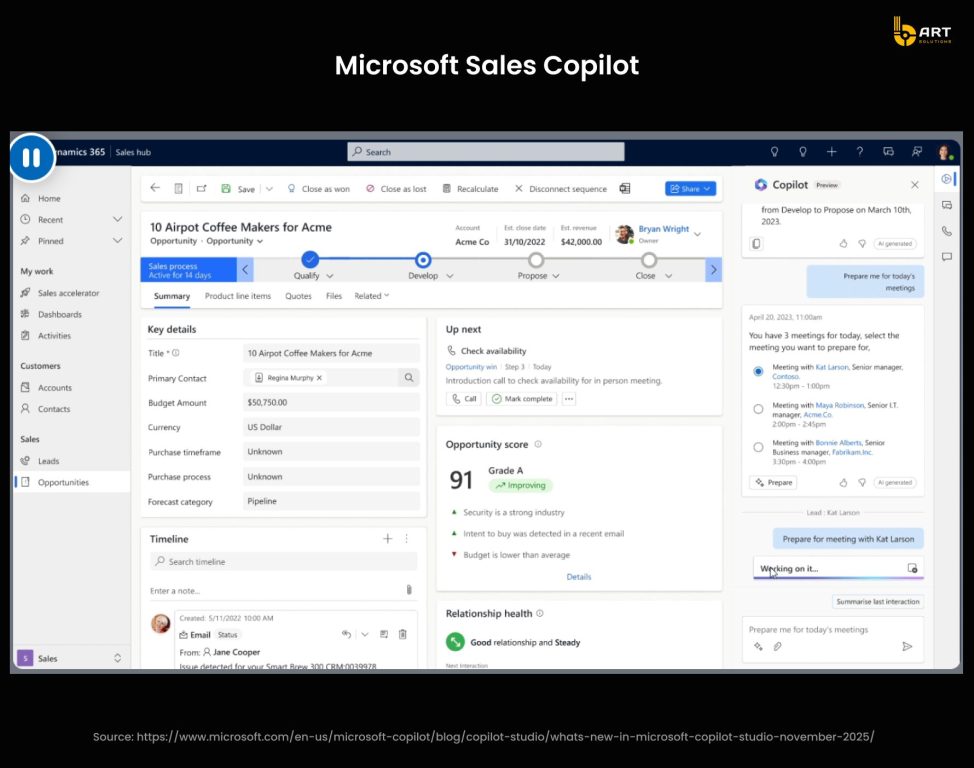
Copilot generates campaign content, email copy, and social posts. Capabilities that Newman’s Own uses to manage time-sensitive social workflows. But without guardrails, content generation creates risk. Off-brand messaging, factual errors, compliance violations, and inconsistent tone emerge from unconfigured implementations.
Dynamics 365 Copilot use cases for content guardrails include:
- Brand voice validation: configuring tone parameters, approved terminology lists, and restricted phrases that flag for human review before publication.
- Legal compliance checks: for example, financial services configure the system to detect regulatory disclosure requirements, healthcare implementations flag HIPAA-related content for compliance review, and consumer goods validate claims against substantiation documentation.
- Approval workflows matching risk tolerance. Newman’s Own implements human validation for all externally-facing content and legally sensitive outputs before publication.
- Content performance feedback loops: tracking which AI-generated variations perform better, then using that data to improve future generation quality.
The March 2025 Dynamics 365 Customer Insights updates introduced content ideas, query assist, and Copilot capabilities for brainstorming marketing copy, creating targeted segments, and using natural language to infer insights. But these capabilities need tuning to match business context and brand requirements.
Smart campaign orchestration (time, channel, message recommendations)
Microsoft Advertising data clearly demonstrates AI orchestration impact: Copilot generates 73% higher click-through rates and 16% stronger conversion rates compared to traditional search, with customer journeys 33% shorter. User satisfaction rose 2% monthly throughout 2025 as the platform learned from interaction patterns.
These improvements emerged from smart orchestration, determining optimal timing, channel selection, and message customization based on customer behavior patterns.
Send-time optimization based on historical engagement data. This means analyzing when specific customer segments open emails, engage with content, and convert. A B2B software company might discover enterprise buyers engage Tuesday-Thursday 10am-2pm while SMB buyers prefer early morning or evening. The system automatically schedules sends accordingly.
Channel preference learning from cross-channel behavior: tracking which customers respond better to email versus SMS, web push versus in-app notifications. Luxe Cosmetics, a UAE beauty retailer, automated campaigns and personalized customer journeys by analyzing channel effectiveness across their customer base.
Message variant selection based on persona attributes. This boils down to different value propositions for various ICPs, different objection handling for different buyer stages, different technical depth for different decision-maker roles. This requires mapping customer attributes to message variants and configuring selection logic.
Frequency capping and saturation prevention/ This is about detecting when a customer has received too many touchpoints in a short period and automatically suppressing additional sends to prevent unsubscribes. One retail client configured rules suppressing emails when customers had received 3+ messages in 48 hours, reducing unsubscribe rates by 40%.
Cross-system automation built by talented teams
The November 2025 introduction of Model Context Protocol (MCP) servers changed Microsoft Power Platform AI automation architecture. Agent 365 now provides enterprise-grade MCP servers exposing granular, auditable tools for Outlook, Teams, SharePoint, OneDrive, and Dataverse, enabling agents to take actions across Microsoft 365 with centralized governance.
Integrating Copilot with Outlook, Teams, SharePoint, and External Data
Agent 365 MCP servers enable specific actions previously requiring custom integrations:
- Outlook Calendar: Create, update, delete events; accept and decline invitations; resolve scheduling conflicts.
- Outlook Mail: Create, update messages; reply and reply-all; semantic search across mailboxes.
- Teams: Create and manage chats; add members; post messages; channel operations.
- SharePoint and OneDrive: Upload files; retrieve metadata; search content; manage lists.
- Dataverse and Dynamics 365: CRUD operations and domain-specific business actions.
The Dynamics 365 Sales MCP server connects CRM data to any MCP-compatible agent platform like ChatGPT, Claude, or custom agents built in Copilot Studio.
Technical configuration requires AI CRM development services teams to:
- Register and approve MCP servers through the Microsoft 365 admin center, applying allow/block policies based on business requirements.
- Configure scoped permissions ensuring agents access only necessary data, so sales agents query customer records but not financial data, service agents access case history but not opportunity pipelines.
- Implement runtime observability: admins navigate to Microsoft Defender portal, run Advanced Hunting queries to inspect trace logs of tool calls, monitor execution details including parameters passed and outcomes, and detect anomalous usage patterns.
- Map data flows between systems: when an agent schedules meetings from email threads, developers configure which calendar systems to check, how to resolve conflicts, what fields to populate in calendar entries, and how to handle exceptions.
Agent-style workflows for end-to-end sales and marketing processes
Rather than static tools for specific actions, agents open forms, set field values, and select actions the same way humans work with the application autonomously.
CRM AI automation for sales teams use this for cross-functional workflows. Let’s look at some practical examples:
Post-service upsell agent: After a field technician completes service, the agent accesses service history through Dynamics 365 Customer Service MCP server, identifies equipment reaching maintenance intervals, generates quote through Dynamics 365 Business Central MCP server, and creates sales opportunity in Dynamics 365 Sales, automatically routing to account manager for review.
B2B event lead prioritization agent: After trade shows, the agent imports lead list from uploaded spreadsheet, enriches records with firmographic data from external APIs, scores leads based on ideal customer profile criteria configured in Dynamics 365 Sales, qualifies high-scoring leads directly into opportunities, and adds low-scoring leads to nurture campaigns in Customer Insights – Journeys. The entire process runs without human intervention except final review.
Account expansion agent: For existing accounts, the agent identifies decision-makers not yet engaged by analyzing org charts from LinkedIn Sales Navigator API, researches recent company initiatives from news sources, detects technology stack changes indicating buying signals, generates personalized outreach for account manager review, and schedules strategy meetings with key stakeholders when acceptance confirmed.
Dataverse context pipelines for better insights and accuracy
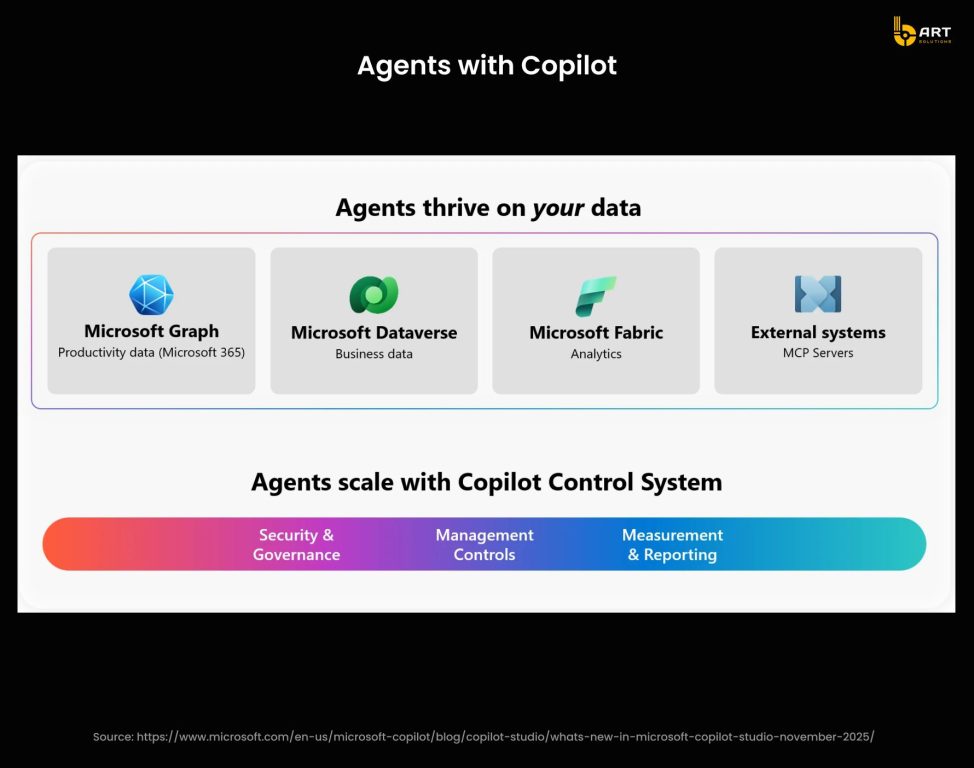
Dataverse serves as the unified data platform enabling agent intelligence. The 2025 Dataverse MCP server makes business data interactive: agents query available tables, run natural language searches over enterprise content, upload and update records, and generate outputs grounded in business context.
Context quality determines output accuracy. Agents accessing fragmented data across disconnected systems produce generic responses. Agents working with unified Dataverse context generate insights matching business operations.
Here is a quick visual oа how it works:
Implementation requirements for agent-ready data:
- Transform external data into Dataverse knowledge. Enhanced Power Platform connector SDK enables structured data from Databricks, Snowflake, SAP, and other enterprise systems to connect to Copilot Studio as knowledge sources. Agents answer questions based on this data without manual configuration.
- Configure grounded AI prompts. Dataverse generates custom AI responses grounded in real records. When an agent summarizes customer account history, for instance, it references actual transaction data, service interactions, and communication logs, not generalized patterns from training data.
- Establish security boundaries. Agents operate within user permission contexts. Access to Dynamics 365 contacts, leads, opportunities, and cases respects existing role-based security. Users without SharePoint permissions to specific documents cannot have agents retrieve that content for them.
- Design conversation history and activity logging. Dataverse stores agent interactions, enabling human-in-the-loop oversight. Users monitor agent performance and review outputs.
- Hire Dynamics 365 developers who have hands-on experience with this kind of architecture and can build agents that maintain context across interactions, learn from outcomes to improve future responses, access appropriate enterprise data without oversharing, and escalate complex scenarios requiring human judgment.
ROI for SMEs and enterprises investing in expert D365 + Copilot talent
Faster implementation, lower long-term costs
According to a Forrester TEI study, Dynamics 365 delivers 106% ROI with a payback period of 17 months. Companies achieved productivity gains of 7-15 hours saved per week per employee, reduced IT infrastructure costs by consolidating legacy systems, and improved profitability through faster data-driven decision-making.
But implementation speed and quality directly affect these returns. Skilled AI CRM development services teams avoid common mistakes that extend implementation timelines, such as incorrect data model design that requires rework, security configurations that fail compliance reviews, integration errors that cause data inconsistencies, and unintuitive workflows.
Competitive differentiation through automation and insights
Enterprise AI CRM integration case studies show measurable competitive advantages:
Newman’s Own tripled campaign volume with the same team size.
Vodafone employees saved an average of 3 hours per week.
Lumen Technologies estimates $50 million in annual savings from Copilot-enhanced sales operations.
These outcomes correlate with implementation quality. Companies that treat AI as a technology purchase rather than a capability that requires careful handling see minimal returns. Those that integrate with the best practices for implementing AI Copilot in CRM in mind build a foundation for sustainable competitive advantage.
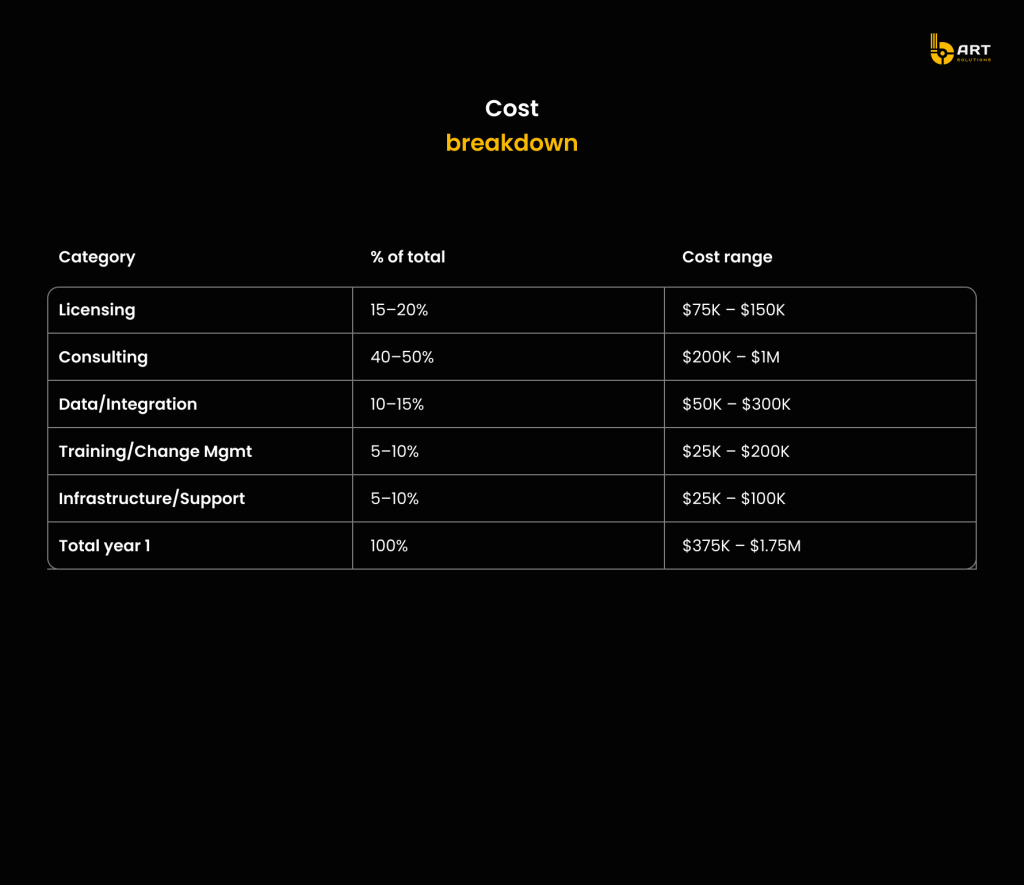
Cost breakdown
Scalable foundation for future agentic capabilities
IDC projects 1.3 billion AI agents by 2028. Businesses that build clean data models, reliable security controls, well-designed integrations will scale into these capabilities quickly and efficiently.
As a reliable software development partner, bART Solutions pivots to maintaining a strong team of Microsoft-certified developers with hands-on experience with Copilot. We go beyond commercial products also working with R&D and giving tech talks for developers to contribute to the community and share knowledge. If you consider integrating Microsoft Copilot into sales, marketing or other workflows, let’s talk.