





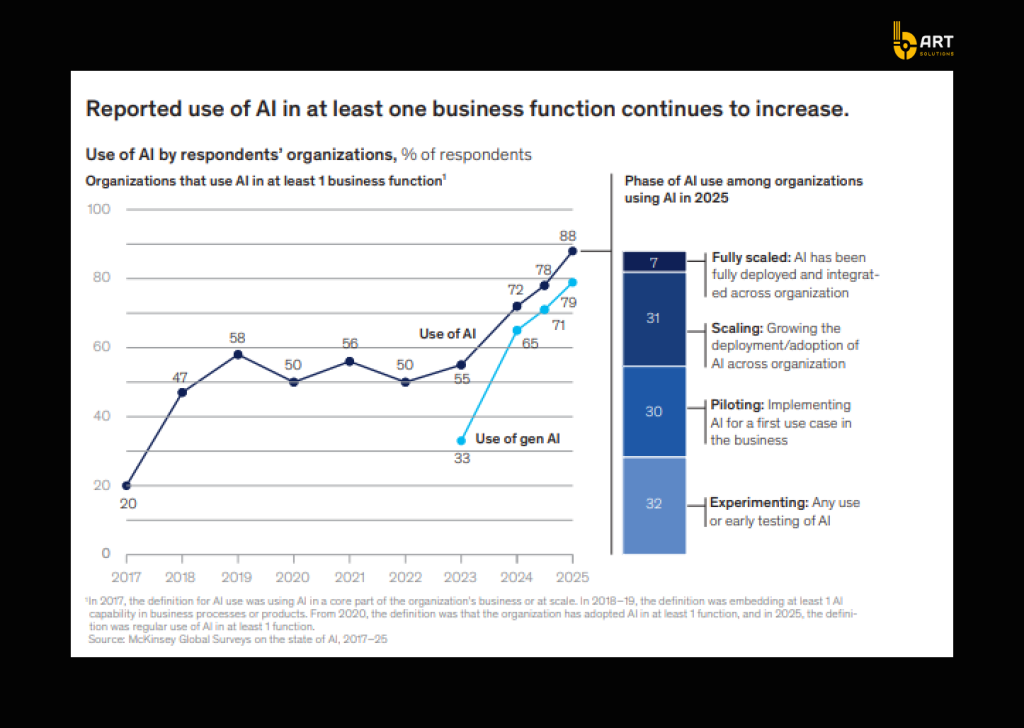
By the end of 2026, more than 80% of enterprises are expected to have used generative AI APIs/models or deployed GenAI-enabled apps in production. McKinsey also reports that 88% of companies use AI in at least one business function, but many are in the experimentation phase, not durable, repeatable delivery.
The gap isn’t about the model. It’s about the environment around it: security, identity, data access, auditability, reliability, cost control, monitoring, and integration with real systems (CRM, ERP, customer support platforms, internal workflows).
This is where .NET + Azure shine. Azure provides the enterprise controls required for production AI, and .NET becomes the execution layer that turns a model response into governed business behavior via API endpoints, workflow orchestration, tool calls, integration logic, and policy enforcement.
What enterprise-grade AI really requires
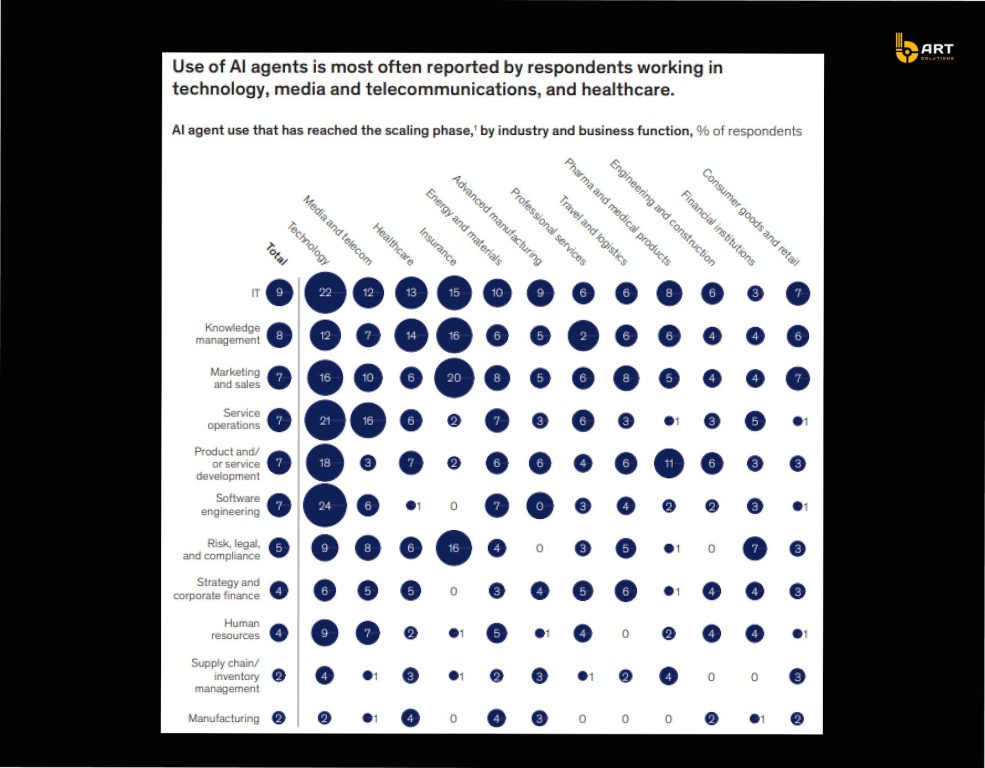
Enterprise AI provides capabilities that can be safely embedded into business operations. To achieve that production AI requires five foundations.
1. Identity security
When LLMs process untrusted inputs, attackers can manipulate prompts to extract sensitive data, override instructions, or trigger unsafe actions. That’s why OWASP places prompt injection and insecure output handling among the most critical risks.
Solution:
- Enforce enterprise identity (Microsoft Entra ID) and role-based access control for app users and services.
- No long-lived keys by using managed identity/workload identity patterns for service-to-service calls.
- Network isolation for private endpoints and virtual networks when AI is connected to internal data sources. Microsoft’s guidance for “Azure OpenAI on your data” covers Entra ID RBAC and private networking configurations.
2. Data governance and boundary control
In enterprise environments, the core question is “What data the model is allowed to see, retrieve, and act on”.
When AI systems are connected to document stores, CRM records, or internal knowledge bases, the main failure is overexposure, when an AI retrieves content that a user should not have permission to access, or content routed through infrastructure that does not match residency and compliance requirements.
The NIST AI Risk Management Framework (AI RMF 1.0) mentions it as something that must be governed across the lifecycle through the following functions: GOVERN, MAP, MEASURE, and MANAGE.
Solution:
- Define and enforce data boundaries: what AI can access, what it must never access, and which actions require human approval.
- Use retrieval with permissions patterns (metadata + entitlements) so RAG systems do not become an access-control bypass.
- Align with Azure’s data-handling and privacy model for Azure OpenAI / Azure AI services, including how data is processed and stored for service operation and abuse monitoring.
3. Reliability and predictable latency
If the AI is embedded into customer support, sales operations, finance workflows, or developer work, it should be measured by the same metrics as any other enterprise service: availability, performance consistency, and operational resilience.
Microsoft has introduced performance commitments aimed at production AI patterns. For example, a 99% latency SLA for token generation (positioned to improve consistency at high volumes) and expanded deployment options such as Data Zones.
Solution:
- Treat AI like a service: timeouts, retries, circuit breakers, queueing for demand spikes, and fallbacks when model calls degrade.
- Azure deployment modes match the workload’s predictability requirements (for high-throughput, provisioned capacity patterns are typically more stable than purely on-demand usage).
- Orchestration logic (rate limiting, caching, workflow state, error handling) is kept in the application layer, a natural fit for .NET services.
4. Cost predictability
Token-based services introduce a new financial pattern: cost can increase with prompt length, context window usage, retrieval strategy, and output verbosity.
Token usage is the most trackable cost unit for GenAI workloads, that highlights financial dynamics like the “context window tax” (longer contexts drive higher cost).
Solution:
- Implement cost controls in the orchestration layer: caps by user/team, request classification (simple vs complex), caching of common prompts, and structured output constraints.
- Track usage by business capability (e.g., “support summarization,” “sales email drafting,” “incident triage”), not by subscription or resource group.
- Establish forecasting practices for AI services and ongoing optimization loops (FinOps guidance now treats AI as a distinct category with its own forecasting and optimization challenges).
5. End-to-end traceability
A study surveying 919 business leaders found that major barriers to moving beyond pilot projects include security and compliance concerns, and technical challenges of managing and monitoring agents at scale.
Solution:
- Instrument AI workflows like distributed systems: correlation IDs, structured logs, prompt/version tracking, retrieval citations, tool-call traces, and audit events.
- Use open standards where possible (OpenTelemetry is positioned as a vendor-neutral observability framework for distributed tracing/metrics).
- Make evaluation and incident response practical: teams should be able to reproduce a failure with the exact prompt version, retrieval configuration, model deployment, and policy state used at the time.
Why .NET is the best application layer for enterprise AI on Azure
Azure provides the managed AI services (models, deployments, governance primitives), and .NET becomes the application layer that turns AI capabilities into production-grade business functionality through APIs, workflow orchestration, integrations, and controlled execution paths.
.NET reduces friction between AI features and existing systems
Enterprise AI has to connect to CRMs, ERPs, document repositories, identity systems, data platforms, and internal APIs. .NET is a common standard for building integration-heavy backend services, and it also carries out AI workloads. All thanks to strongly typed APIs, mature dependency injection patterns, middleware pipelines, and consistent hosting across Windows/Linux/container environments. Microsoft proves the point by continuing to invest in first-class AI integration building blocks for .NET.
Safer integration through supported .NET SDKs
One reason early GenAI prototypes struggle to become production software is that they are built with ad-hoc HTTP calls and loose JSON handling. Microsoft has been moving toward more production-oriented .NET client libraries that support Azure OpenAI scenarios with typed request/response models and Azure-specific configuration.
- Microsoft’s documentation describes the Azure OpenAI client library for .NET as providing strongly typed support for Azure OpenAI-specific request/response models and configuration.
- The OpenAI platform also lists Azure-maintained libraries compatible with both OpenAI API and Azure OpenAI services, including .NET.
- The official OpenAI .NET library is maintained as an OpenAPI-generated SDK in collaboration with Microsoft, which is relevant for projects that need portability between OpenAI API and Azure OpenAI patterns.
The outcome for enterprise delivery is clear: fewer integration errors, clearer upgrade paths, and a more supportable approach when models, endpoints, or response formats evolve.
.NET has mature options for orchestration
As soon as an AI-based project moves beyond a single prompt/response, it becomes orchestration-heavy: document ingestion, retrieval indexing, multi-step reasoning, tool execution, approvals, retries, and long-running workflows. This is not a model concern; it is an application concern.
Microsoft documents Durable Functions for Azure-native orchestration in .NET as the optimal way to run stateful orchestrations in a serverless environment, with an orchestrator function coordinating other functions. .NET pairs well with Azure AI: the model is treated as a managed dependency, while the workflow reliability remains governed by orchestration patterns.
Agentic patterns are becoming standardized in the .NET ecosystem
Many enterprise AI roadmaps include agent-like behaviors: delegating tasks, calling tools, using memory, coordinating multiple specialized steps. But agent frameworks are often difficult to maintain and govern.
Microsoft’s Semantic Kernel Agent Framework is designed to support creation of agents and agentic patterns within applications, and includes an “Agent Orchestration” capability from the start. So agent patterns are treated as repeatable software architecture, which gives teams a clear path to implement tool-calling and multi-step AI behaviors inside a standard .NET application structure.
Performance and scale
Enterprise AI projects quickly become API-heavy: they need fast gateways, strong concurrency, and predictable throughput. And Microsoft’s ASP.NET Core performance page references TechEmpower Round 23 results and positions ASP.NET Core minimal APIs as capable of very high JSON response throughput.
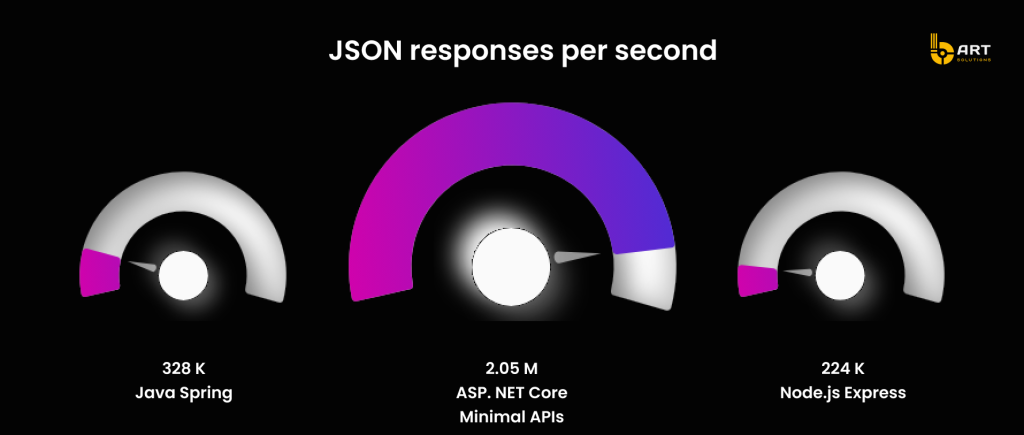
This makes .NET a realistic choice for AI-enabled products where the AI capabilities must run behind high-volume, latency-sensitive APIs.
Azure + .NET reference architecture for enterprise AI
Enterprise AI is usually delivered through web apps, internal portals, or embedded product UI. The experience layer captures user intent, enforces session/user context, and delegates AI execution to the backend. A practical benefit of keeping AI calls server-side is that it makes it much easier to standardize the controls, such as consistent request policies, rate handling, logging, and the ability to evolve prompts and retrieval strategies.
.NET AI gateway
The most stable pattern is to treat AI as a platform dependency and put a .NET AI gateway API in front of it. This API becomes the central point for:
- routing requests to the right model deployment and configuration
- enforcing structured outputs where needed (JSON schemas, constrained formats)
- handling tool calls (search, CRM lookups, internal APIs) with explicit allow-lists
- applying versioning for prompts and retrieval settings
- capturing trace data consistently across every AI request
Microsoft’s .NET RAG tutorial follows the following shape: a .NET app acts as the orchestrator between the user interface, Azure OpenAI, and Azure AI Search, and doesn’t allow the client to interact with the model directly.
Model layer
A model layer is basically a managed service that an app calls through a controlled interface. The key design choice here is about how model access is organized: consistent deployments, environment separation, and change management, so development teams can change configurations safely.
Microsoft’s AI architecture guidance and Azure platform architecture references emphasize designing AI workloads with an approach that anticipates rapid change and nondeterministic behavior, and building for adaptability as models and patterns evolve.
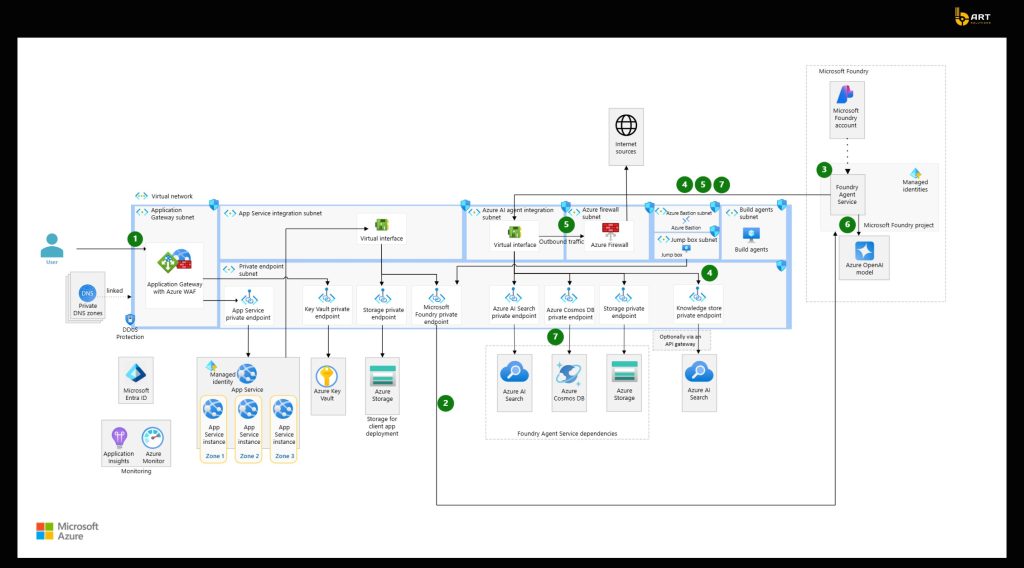
Observability and evaluation
A baseline enterprise AI architecture should include two feedback loops:
- Operational telemetry: request tracing, latency, failures, downstream tool call outcomes
- Quality evaluation: periodic and release-gated checks that detect regressions as prompts, retrieval, or model deployments change.
Microsoft’s Well-Architected AI guidance states that AI workloads introduce nondeterminism and require operational practices tailored to that, including lifecycle thinking. That means that AI projects can’t be delivered once, they need to develop and evolve constantly.
Moving from PoC to a scalable enterprise AI solution
A reliable path from prototype to production revolves around turning the AI feature into a managed system. Here is a step by step guide on how to do it.
1. Start with a use case definition
A PoC that only proves that the model can respond doesn’t survive contact with real users and enterprise constraints. A strong a use case definition should include:
- Business outcome and KPI: time-to-resolution reduction, agent assist adoption rate, onboarding completion time, deflection rate, cycle time reduction;
- Data boundary: which repositories and record types are in scope, and which are explicitly out of scope;
- Latency and reliability expectations: especially if the AI sits inside interactive workflows;
- Success criteria for quality: what “good” looks like in answers and actions.
Build the dataset and retrieval strategy
In enterprise settings, the limiting factor is in how reliably the system can ground responses in the right internal information, under the right permissions.
The production step here is to treat retrieval as an engineering deliverable:
- define document classes: policies, tickets, product specs, contracts, SOPs;
- standardize chunking and metadata;
- establish an update cadence: define what gets re-indexed, when, and why;
A practical advantage of using Azure’s AI workload guidance is that it separates model evaluation from system testing, which helps to avoid a common mistake: improving prompts and ignoring the retrieval pipeline and downstream reliability.
Implement evaluation gates before scaling users
Production AI requires two kinds of testing:
- Model / response evaluation: quality, relevance, safety, groundedness;
- End-to-end system testing: retrieval correctness, latency, failure handling, tool call behavior, regression risk.
In practice, this becomes a release discipline:
- baseline test set (known questions/tasks with expected outcomes)
- regression checks on prompt/retrieval/model changes
- rollout gates (e.g., internal users → limited pilot → broader release)
This approach successfully prevents unseen degradation when the system evolves and changes.
Stabilize performance with explicit capacity planning
For workloads where latency predictability matters, such as customer-facing copilots, agent assist, interactive internal tools, capacity planning cannot be left to assumptions.
Keep in mind that AI performance is an engineering responsibility:
- measure token budgets per request type
- define peak and sustained throughput needs
- choose deployment types that match SLA expectations.
Put cost tracking as part of the product
Enterprise AI cost management works best when token usage is tracked like any other consumption metric, by feature, team, and business capability.
A mature production setup should include:
- cost attribution tags per use case: support summarization vs sales enablement vs ops assistant;
- prompt and context policies: avoid uncontrolled “context window creep”;
- caching and response-shaping strategies aligned with business value, not maximum verbosity.
An unmanaged unit economics in this case is one of the fastest ways for a “successful pilot” to be deprioritized or shut down.
Operationalize lifecycle management
Enterprise AI systems evolve constantly with model upgrades, retrieval index changes, prompt improvements, new tools, new policies. That’s why AI should be treated as a lifecycle-driven product.
A lifecycle baseline boils down to:
- prompt and retrieval configuration versioning;
- release notes and controlled rollouts;
- quick rollback mechanisms for degraded quality;
- incident workflows that can reproduce failures using the exact configuration used at the time.
Choosing the right Azure hosting model for the AI layer
For most enterprise- AI solutions, “the AI layer” is not a single component. It usually includes:
- an interactive AI gateway that serves user-facing requests
- background pipelines for ingestion, indexing, evaluation, and scheduled maintenance.
App Service
App Service is the cleanest fit when the AI gateway behaves like a normal web/API workload: steady traffic, predictable deployment model, and a desire to keep operational overhead low.
From a governance and production-readiness standpoint, App Service has a well-defined service commitment: Microsoft states 99.95% availability for Apps running in a customer subscription, with no SLA for Free/Shared tiers. This makes App Service a solid default for enterprise AI endpoints that need a stable runtime for the orchestration layer (authentication, policy enforcement, and controlled calls to Azure OpenAI and retrieval services).
Where App Service performs: a central .NET API that mediates model calls, enforces output structure, logs trace data, and integrates with internal systems, without needing a Kubernetes operating model.
Azure Functions
Azure Functions is the strongest fit when the workload is naturally asynchronous or spiky: document ingestion, enrichment, scheduled re-indexing, batch evaluation, or trigger-based processing from queues/events.
The Elastic Premium plan is a dynamic scale option designed for production workloads that need more predictable runtime characteristics than pure consumption. It also provides traits that matter for enterprise AI pipelines, like no cold start, VNET access, and a billing model based on allocated core-seconds/memory, with at least one instance allocated.
Where Functions perform best: ingestion pipelines, indexing orchestration, scheduled evaluations, and queue-driven tool execution, especially when demand is uneven.
AKS
AKS becomes the preferred model when AI capabilities are part of a broader microservices platform, when networking and security requirements are complex, or when teams need standardized Kubernetes operations across multiple services.
Two facts are relevant here for decision-makers:
- AKS has an explicit Uptime SLA model for the Kubernetes API server endpoint: documentation and Microsoft Q&A materials describe 99.95% availability for clusters using Availability Zones and 99.9% for clusters not using zones (for customers with Uptime SLA).
- AKS tier documentation states that the Standard tier targets production workloads, supports clusters up to 5,000 nodes, and notes that Uptime SLA is enabled by default in that tier.
Where AKS performs best: large-scale AI-enabled platforms with multiple services, strict network segmentation requirements, higher operational maturity, and the need for Kubernetes-native deployment/observability patterns.
Hybrid by design App Service + Functions + AKS
In practice, many enterprise implementations do not choose one compute model, they separate responsibilities:
- AI gateway API on App Service (or AKS if the business is Kubernetes-first);
- Pipelines and batch processes on Functions Premium for elastic scaling;
- Core product microservices on AKS where a Kubernetes operating model already exists.
Real-world example
Blip: high-volume customer conversations with strict performance expectations
Blip is a conversational platform provider that supports brands across industries. It processes more than 1 billion messages per month, which makes performance consistency and operational scalability non-negotiable.
The company’s goals were not limited to “adding AI.” They aimed to accelerate delivery of new capabilities, ensure scalability, and uphold security measures that build customer trust.
The foundation: Azure OpenAI + .NET + AKS in a microservices architecture
Blip runs on a microservices-based architecture hosted on Azure. It includes messaging, storage, processing, and AI capabilities, with Azure OpenAI Service, .NET, and Azure Kubernetes Service (AKS).
This is a typical enterprise pattern: the model is introduced as a managed capability, while application behavior is governed through services that already follow production engineering practices.
Blip reports that suggestion acceptance increased from 30% to 80% after implementing the new approach.
What helped their modernization survived beyond the idea:
- CI/CD and delivery automation: Blip uses Azure DevOps to improve development and deployment timelines in a highly secure environment and to deliver consistent performance during traffic peaks.
- Scalability mechanics: Blip autoscales resources to meet traffic increases and maintain consistent performance during peak times.
Blip .NET modernization
Blip also modernized their frameworks from .NET to .NET Core as containerization became a priority, followed by migration to .NET 8 to benefit from performance optimizations (CPU usage improvements, GC management, memory allocation optimizations).
Transferable lesson for enterprise AI
The AI success, such as better suggestions, higher adoption, is directly shaped by platform decisions, standardized deployment and security practices, scalable hosting, and an application layer that can evolve without breaking operations.
Common failures modes in enterprise AI implementations
After initial pilots, enterprise AI projects tend to fail for reasons familiar to any large-scale software initiative: uncontrolled complexity, missing operational discipline, and integration risk. The difference is that AI adds nondeterminism and a new attack surface, which makes weak foundations show up faster. Below are failure patterns that repeatedly block scaling and the mitigation patterns implemented with .NET and Azure.
Ungovernable direct-to-model architecture
Failure mode: Teams connect UI directly to a model endpoint. It works in a demo, but rapidly becomes difficult to control: inconsistent prompts, fragmented logging, uneven policy enforcement, and scattered integration logic.
Mitigation pattern: Use a dedicated application-layer gateway (commonly a .NET API) that centralizes policies: prompt versioning, output shaping, tool-call allow-lists, auditing, and cost controls.
Operationally unsafe retrieval
Failure mode: RAG is implemented, but without durable engineering controls, resulting in stale indexes, inconsistent chunking, missing metadata, or retrieval that does not align with access rules. Over time, accuracy erodes and trust declines, even if the model itself has not changed.
Mitigation pattern: Treat retrieval and indexing as a managed subsystem: ingestion pipelines, refresh strategy, and metadata discipline.
No evaluation gates lead to silent regressions
Failure mode: Teams adjust prompts, switch models, or change indexing strategies, but they do not run systematic evaluation. Quality drifts, inconsistently across user groups, and the organization loses confidence because failures are hard to reproduce.
Mitigation pattern: Establish two layers of testing and evaluation: model-response evaluation plus end-to-end system tests.
Latency volatility and throughput limits
Failure mode: A pilot works for a small group but becomes unreliable when expanded: latency spikes, retries cascade, and user experience degrades. This is extremely damaging for interactive scenarios.
Mitigation pattern: Plan capacity deliberately and select compute models based on workload shape.
Cost growth that is disconnected from business value
Failure mode: AI usage expands organically. Costs rise, but teams struggle to explain which features or workflows are driving consumption. Budget owners often respond by restricting usage, and adoption stalls.
Mitigation pattern: Token-aware cost attribution and guardrails by feature. In a .NET layer, this is typically implemented as policy enforcement: request classification, budget caps, caching patterns, and structured output controls.
Agentic ambitions without governance and monitoring
Failure mode: Teams attempt agent-like workflows (tool calls, multi-step tasks) without robust monitoring and lifecycle controls. When failures occur, the organization cannot trace what happened or why, and risk perception grows.
Mitigation pattern: Treat agents as production software, not as a prompt experiment. This means strict tool allow-lists, auditable execution paths, and end-to-end observability. Industry research consistently points to monitoring/management and security as major barriers to scaling agentic AI beyond pilots.
What should exist before scaling beyond a pilot
- A workload definition that includes nonfunctional requirements
A pilot should not move forward without a defined reliability target, performance expectations, and operational model. - A grounding data workflow that is testable.
If the software uses RAG, the ingestion → chunking → indexing pipeline must be treated as a first-class subsystem. - A formal approach to failure handling in the AI dependency chain.
Production readiness requires simulation of throttling (for example HTTP 429), timeouts, and service unavailability, with verified retry/backoff/circuit-breaker behavior. - Capacity planning aligned to how the AI capability is consumed.
Interactive experiences (copilots embedded in daily workflows) need predictable latency and throughput; background pipelines can be handled differently. The readiness gate is not it works, but it works under the expected concurrency and request profile. - A release discipline that includes evaluation gates.
Mature AI teams treat changes to prompts, retrieval configurations, and model deployments as versioned releases with regression checks, because quality can drift without obvious failures.
Build vs buy vs augment and how to structure delivery
For most businesses, the real decision is not build or buy, it’s what must be owned internally vs what can be accelerated safely. Here is a working decision framework:
Own internally (core differentiation):
Business logic, domain rules, permission models, and the data boundary definition—because these are tied to accountability and compliance.
Standardize on proven building blocks (reduce reinvention):
AI gateway patterns, retrieval infrastructure, testing/evaluation automation, and operational telemetry, because these are repeatable engineering concerns.
Augment with a trusted partner (speed without compromising governance):
Architecture design, platform hardening, CI/CD integration, and reliability testing.
A clean way to structure an outsourcing/outstaffing engagement without turning it into an open-ended build is a staged model:
Architecture and risk workshop (1-2 weeks): confirm workload requirements, data boundaries, and the reference architecture; select hosting approach based on uptime/ops constraints (e.g., App Service vs AKS vs Functions Premium), using SLA-backed expectations as part of the decision.
Pilot with production scaffolding (3-6 weeks): implement the AI gateway, retrieval baseline, observability, and cost attribution signals (not a demo-only PoC).
Hardening and scale (4-8 weeks): add evaluation gates, failure simulations, load testing profiles, and operational runbooks.
Handover and enablement: internal documentation, ownership boundaries, and ongoing optimization cadence (quality + cost).
Conclusion
Enterprise AI succeeds less because a model is impressive, and more because the system around it is reliable: secure identity, governed data access, auditable integrations, and deployment paths that survive real traffic and real compliance. In practice, .NET provides the engineering surface where AI becomes a feature (APIs, services, policy enforcement, and business logic), while Azure provides the control plane for scaling, security, observability, and managed AI building blocks.
bART Solutions builds Microsoft-first systems where AI is deployed as part of the product, not bolted on. The team delivers custom solutions using Azure and .NET, and connects them to business platforms like Dynamics 365 and Power Platform when AI needs to live inside everyday workflows.
If you are planning an Azure-based AI project and that requires a clear, buildable foundation, architecture choices, integration approach, and an implementation plan that won’t collapse under security and scale, reach out to us and let’s run a short discovery call.